Examples of the tools for which the wiki currently has templated pages are blogs, intranets, language translation technologies, mobile phones, Skype, social media, tagging and social bookmarking, video, and, of course, wikis.
Examples of methods (processes) covered are after action review, appreciative inquiry, critical moments of reflection, impact pathways, mediation, mentoring, Samoan circle, storytelling, speed geeking, and the World Cafe.
The designers of the Knowledge Sharing Toolkit offer help to users in identifying tools and methods of particular relevance to their needs by making suggestions for a number of contexts (not mutually exclusive) in which knowledge sharing is important:
Improving impact through knowledge sharing in research
The page devoted to each of these contexts lists the sorts of questions that typically arise, and suggests tools, methods, and tags of likely relevance. (Each tool and method can be tagged by users. The list of tags is here.)
As an example, you might look at the page for people undertaking advocacy. You will see these four questions and the associated lists of tools, methods, and tags suggested as likely to lead to good answers:
How do we get input on our issues from key constituents? Tools and Methods: The World Cafe, Listening Tags: relationship, collaboration, alliances
How do we make our issues visible to the people we want to reach? Internally and externally? Tools and Methods: Storytelling, Knowledge Fairs, Intranets, Blogs, Microblogging, Workplace Knowledge Sharing Tips, Rural Radio, Wikis Tags: content, dissemination, information, offline
How do we use the web to inform our key publics on issues? Tools and Methods: Blogs, Microblogging, Frequently Asked Questions, Language Translation Technologies, Ritual Dissent Tags: content, dissemination, information, offline
How do we make it easy to get people to act on issues and spread the word themselves? Tools and Methods: Blogs, Microblogging, Mobile Phones, Online Surveys, Rural Radio, Social Media, Social Networking Sites, Yellow Pages, Samoan Circle, Wikis, Peer Coaching, Peer Assists, Graphic Facilitation, Good Practices, Community Interactive Theater, Chat or Talk Shows Tags: relationship, collaboration, online, offline
To polish off the guidance on sources of knowledge about how best to pursue advocacy, the page concludes with a list of additional tags with a decent probability of leading to useful pages in the wiki — namely, advocacy, alliances, collaboration, content, dissemination, information, networks, offline, online, relationship, and stakeholders.
For more of an overview of the thinking behind the Knowledge Sharing Toolkit, you can read a June 2008 report written by Gerry Toomey, who has worked as a consultant for CGIAR and the Knowledge Sharing Project.
An earlier post discussed what the Internet guru Clay Shirky thinks about the future of newspapers. Now I've come upon another essay of Shirky's that provides food for thought for anyone interested in how tags are used to characterize and sort digital information.
Shirky's essay is based on a pair of talks he gave back in the spring of 2005, so when you read it, you'll find many of the points he makes are old news. What I found particularly useful was his analysis of the conditions under which a traditional pre-set taxonomy, such as the Dewey decimal system, is appropriate and, on the other hand, when we are well-advised to adopt a user-generated, free-form taxonomy.
Shirky argues that a traditional hierarchical taxonomy works well if the domain of information to be organized has these characteristics:
Shirky enumerates the advantages he sees in adopting a tagging system for information stored on Web pages. For example, one is able to develop an informed opinion of the likely value of a particular set of tags by paying attention to who did the tagging and how long ago the tagging was done.
Shirky's concluding thought is that "by letting users tag URLs and then aggregating those tags [across users], we're going to be able to build alternate organizational systems, systems that, like the Web itself, do a better job of letting individuals create value for one another, often without realizing it."
On October 2, Traci Armstrong and Tracy Coté posted at BNET.com a set of seven concrete tips "for helping hiring managers find your resume online." Anyone searching for a job would benefit from acting on this advice.
In brief:
There are a number of sites, such as LinkedIn and Twitter, where you need to establish an attractive presence. Armstrong and Cote also suggest setting up your own web page, on which you can then post your resume.
Carefully choose keywords relating to your skills, experience, and work history that match the keywords you anticipate recruiters with suitable jobs will be searching on.
Use a version of your name that is reasonably distinctive. (This particular tip is one I won't be following since I've always enjoyed having a simple name. Instead, I depend on my company name to make me stand out.)
Participate in social media interactions. Consider doing some blogging, perhaps as a guest on an established blog that's relevant to your field and interests.
If you're blogging, and you have creative work you can show off, go beyond simply demonstrating your writing skills. I.e., include photographs, illustrations, etc. Give them informative captions and suitable tags. Also, "make sure all of your digital profiles link to your blog, driving traffic to it and improving your Google ranking."
Tweet and encourage re-tweets. The more click-throughs you get, the higher your Google ranking.
Join groups. "Look for like-minded people in your industry and find ways to interact. Be open about your job seach, join discussions, answer questions and post links to valuable content ..."
The name of the game is making it highly probable that you, your resume, and samples of your work will surface when recruiters you'd like a chance to talk to are searching for promising-looking individuals to contact.
As indicated in the graphic below, knowledge capture is the step that gets the knowledge tranfer cycle underway.
This graphic comes from an article in the September 2009 issue of Chief Learning Officer. In the article, Marty Rosenheck walks the reader through all the steps in the cycle.
In detailing how to handle knowledge capture, Rosenheck suggests two tools you can use in tandem to elicit the tacit knowledge that experts in your organization bring to bear in their decision-making.
The first of the tools is a card sort:
... a group of experts brainstorm problems, issues and typical situations that they encounter and write them on index cards. They then sort the cards into categories that make sense to them, and then subcategories, creating a tree structure, which reveals the way they organize their knowledge.
... For example, these experts organize problems by how they are solved, using categories such as “communication problems with subcontractors.” The sorting task also enables the construction of a taxonomy of cases, where typical situations are categorized and sequenced from simple to complex to serve as a model for initial learning for novices.
Once you have used a card sort to categorize the various situations your experts handle, you can move on to eliciting details of how exactly they complete tasks and solve problems. For this phase of knowledge capture, Rosenheck suggests drawing up a process table.
As Rosenheck explains, a process table walks your experts through the steps and sub-steps they take in each of the previously categorized scenarios.
For each decision or action, the goal is to elicit the implicit heuristics or guidelines that the expert uses. It begins with first asking, “Why?” Then, after the first answer, which just scratches the surface, keep asking why again ... until you have gotten to the bottom of the decision. Another method is to have the expert compare this decision [for a particular scenario] to decisions in other situations, to get at the distinctions in the expert’s mind.
The remainder of the process table captures the information, resources and tools the expert uses to accomplish that task or make the decision, and how they’re used. Finally, find which other people are involved at each step and what they see as common pitfalls.
As a follow-on to yesterday's post dealing with DITA (the Darwin Information Typing Architecture), I'd like to call attention to a white paper (pdf) explaining how an organization can adopt DITA incrementally.
The above graphic shows the six levels that Michael Priestley (IBM) and Amber Swope (DITA Strategies), authors of the white paper, define for gradually expanding the scope of an organization's implementation of DITA.
Level 1:Topics — Migrate existing XML content to DITA — using the appropriate topic type for each chunk of information — in order to establish a single source for each topic. "You can easily generate the same information in multiple formats by specifying a different output type when you publish."
Level 2:Scalable reuse — Enable flexible reuse of information by using maps to assemble each deliverable, such as a manual or a Web page. "Because each map is specific to a deliverable, you can optimize the content to include the organization of the content and the links between the topics for each deliverable type."
Level 3:Specialization and customization — Achieve quality and consistency by defining the content types required to meet different author and audience needs and specifying how to meet those needs using structured, typed content. "In addition to creating new structural standards, organizations may choose to customize transforms to provide customized output deliverables, such as training materials or data sheets."
Level 4:Automation and integration — Adopt a full content model by explicitly defining the different types of content required to meet different author and audience needs, and specifying how to meet these needs using structured, typed content. "Organizations need a CMS [content management system] to effectively control and automate the content development life cycle. In addition to storing content and providing versioning control, the CMS provides workflow automation support that assists authors in creating, reusing, and publishing. ... In addition, you need to define a robust metadata model to support the content model and apply it to all topics. Lastly, you must have agreed-upon content development processes in order to automate them with workflow control."
Level 5:Semantics on demand — Achieve dynamic personalization by using DITA as a cross-application, cross-silo tool. "This ... becomes a strategy that covers every source of semantic data or content: DITA becomes the common currency between semantic applications. Data can be exposed as DITA maps; structured or semi-structured content can be exposed as DITA topics at various levels of specialization; and unstructured content such as PDFs, images, or multimedia files can be wrapped using DITA maps to provide a common interface for associating and storing titles, descriptions, and metadata."
Level 6:Universal semantic ecosystem — Achieve universal knowledge management. "DITA becomes the semantic interchange standard for cross-organization, cross-standard, universal content use. ... [O]rganizations that make the move to DITA become part of a semantic ecosystem that enables information sharing and collaboration where and when it’s required, without expensive infrastructure negotiations."
You can read a Q&A with Priestley and Swope, in which they talk about the ABCs of the DITA Maturity Model, here. Note that Priestley and Swope acknowledge that Levels 5 and 6 are pretty much aspirations at the moment. Even Level 4 implementation of DITA is infrequent, so far.
If you are involved in production of documentation that can benefit from chunking and reuse of various modules, you should know about DITA — the Darwin Information Typing Architecture.
DITA was initially developed by IBM, which donated the system in 2004 to OASIS — the Organization for the Advancement of Structured Information Standards. OASIS is now the body that maintains DITA standards.
is an XML-based, end-to-end architecture for authoring, producing, and delivering technical information. This architecture consists of a set of design principles for creating "information-typed" modules at a topic level and for using that content in delivery modes such as online help and product support portals on the Web.
Over the years, the variety of materials produced using DITA has expanded beyond technical documentation. Also, aesthetically aware authors have advanced beyond spare, default formatting. You can see a sample of recent DITA Web output that includes video here. This sample is an appealing contrast to more heavily text-based documentation, such as that here.
DITA's core design principles are:
Topic orientation — DITA is used to create discrete units of information, each of which covers a specific subject with a specific intent.
Topic aggregation — Self-contained topics are combined with other topics to produce documents suited for particular purposes and audiences.
Strong typing — Document type defintions (DTDs) and schemas guarantee that DITA topic types follow identical information structures.
Specialization — DITA enables extending basic topic types to new types adapted for a particular use.
Common base class — A top-level topic type provides “fallback” for all specialized types. This ensures that content that contains specialized types is compatible with DITA implementations that do not include these particular types.
Once topics have been created, how some or all of them are used in a particular document is defined by a map. The map organizes the chosen set of topics into a hierarchy (topics and subtopics) and sequence. Use of maps enables a different organization for different deliverables. It also enables reuse of topics.
OASIS's DITA FAQ provides a good complement to the DITA knowledge base you can access here. For a practical guide to using DITA, you can read and work through Louise Kasemeier's 2007 manual and tutorial, DITA for Solo Writers (pdf).
One last point: The reason this architecture is named after Charles Darwin is explained here.
Here at Streamline we look fondly on anything educational that accomplishes its purpose in a way that is as quick and simple as possible. A fine example of this principle in action is the 3:25 video below, "Social Bookmarking in Plain English." It was created by Lee LeFever, using decidedly low-tech materials and technique.
LeFever's flight from bells and whistles in no way compromises the clarity of his explanation of social bookmarking (i.e., sharing your favorite websites, duly tagged, with the wider world).
Although the version of the video I've embedded above is from YouTube, its original home is CommonCraft.com, the site where LeFever and his wife post short videos that introduce beginners to subjects that are confusing and complicated if too much information is presented in what is advertised as an overview.
In addition to their brevity, all the Common Craft videos use plain English, another practice that Streamline very much favors.
You can browse through Common Craft's other videos here.
Yesterday's Washington Post had an article about the inauguration of the World Digital Library (WDL), on online archive of primary sources being continuously expanded under the sponsorship of UNESCO.1
As explained at the WDL website, the mission of the WDL is to make "available on the Internet, free of charge and in multilingual format, significant primary materials from countries and cultures around the world." The principal objectives of this endeavor include expanding "the volume and variety of cultural content on the Internet," providing "resources for educators, scholars, and general audiences," and building capacity in partner institutions (generally, libraries and archives) "to narrow the digital divide within and between countries."2
The image below is just one example of what you will find at the WDL, which currently has upwards of 1200 items.
"Basic and Advanced Flying School for Negro Air Corps Cadets, Tuskegee, Alabama... In the Center is Capt. Roy F. Morse, Air Corps. He is Teaching the Cadets How to Send and Receive Code." (World Digital Library)
When you visit the page on which this image is displayed, you can see the care with which the archivists have assigned categorized tags ("consistent metadata") to assist visitors in finding the image when searching using various filters, such as location, time period, topic, type of item (book, photo, musical score, etc.), and home institution.
__________ 1 The WDL website is hosted at the US Library of Congress. The plan is to establish mirror sites elsewhere in the world in due course. (Note that the Library of Congress maintains an analogous program of digitized primary materials relating to the United States — the National Digital Library Program — which you can read about here.)
2 The languages in which navigation tools and item descriptions are available are Arabic, Chinese, English, French, Portuguese, Russian, and Spanish. The plan is to add more languages over time, but doing so is at a lower level of priority than "increasing the volume and diversity of content from and about all countries in all languages and building digital capacity in developing countries."
Strictly speaking, this is a rhetorical query because, at this stage of the game, a wealth of reports has accumulated of companies that have realized valuable results from adding tools like blogs and wikis to their intranets. The real questions Conry-Murray addresses are "Under what circumstances does enterprise social networking pay off?" and "How can you gauge the size of the payoff?"
The whole article, including its sidebars, is worth reading. As an overview, here are the five best practices Conry-Murray recommends for making the most of social networking:
Start with a low-cost pilot to see what tools deliver useful results.
Set modest expectations. "Don't promise executives that enterprise social networking will unleash, ignite, or synergize anything." Instead: "Describe one or two general business improvements you think are achievable. Set reasonable goals for user adoption, and salt your initial deployment with a few teams that are eager for these kinds of tools. And keep an eye out for ways to measure business value. You may not be expected to produce hard numbers from a pilot, but corporate management will want to know the payback down the line."
Let employees use the tools with lightly controlled freedom. If you impose any but the most obvious restrictions (e.g., "No flaming."), you will inhibit participation and constrain dialogue.
Resist exclusivity. When a business unit or team says they want their tools to be accessible only to themselves, press the argument that the full benefit of enterprise social networking comes from openness to broad participation.
Include robust search capabilities. And: "Be sure the search engine allows for user-generated feedback such as tags and content-rating systems, because the point of social networking in business is to let people provide input into the relevancy of content and people."
As a final note, if you find the powers-that-be are leery of the term "social networking," shift to something more business-sounding, like "collaboration tools," until the "social networking" label becomes familiar to the people who have to authorize introduction and roll-out of the tools you believe will contribute to your organization's productivity and growth.
Media Cloud is a system that lets you see the flow of the media. ... Media Cloud automatically builds an archive of news stories and blog posts from the Web, applies language processing, and gives you ways to analyze and visualize the data.
What types of stories are covered by which media sources?
Where do particular news stories begin?
What areas of the world garner attention, and which do not?
How does the blogosphere's coverage of an issue compare to the mainstream media's?
What role do comments and other participatory channels on the Web play in setting the news or political agenda?
An alpha release of the Media Cloud code is available for download. The code sets up a web application that lets you manage a set of about 1500 media sources (including blogs) and their feeds. The system periodically crawls the feeds and downloads any new stories. Then, the system "[e]xtracts the substantive text from the downloaded story content (minus the ads, navigation, comments, etc) and associates a set of tags with each story based on that extracted text."
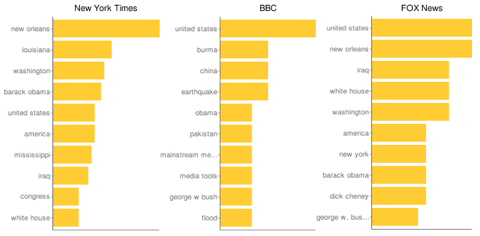
At the moment, only three types of visualization of a media source's news coverage are available. You can compare up to three sources at a time.
The three chart types are:
A bar chart showing the ten terms used most frequently in each of your chosen sources. The image below is an example.
(generated using the Media Cloud system)
A bar chart showing, for a prominent person, place, or event you select, the ten terms used most frequently in each of your chosen sources. The image below is an example. It shows the top 10 phrases used by the New York Times, the BBC, and Fox News in stories, from the past six months, that referenced "Katrina."
In previous posts, I've discussed the data visualization work of Edward Tufte, Hans Rosling, and the IBMers of Many Eyes. If this subject is of interest to you, you can also investigate what swivel.com has to offer.
As a follow-up to yesterday's post on facilitating informal learning, I'd like to call attention to thoughts on the subject that consultant Jay Cross, offered in the same October 2008 issue of Chief Learning Officer as contains the article I highlighted yesterday.
Cross provides a Before-and-After case study of knowledge management and informal learning at CGI, a Canadian IT outsourcing firm.
The Before situation was one of overly elaborate knowledge management infrastructure that didn't work.
The After situation was what CGI dubbed "Internet Inside," an enhanced intranet constructed internally using mostly open-source software. The purpose of Intranet Inside, which has a distinct Web 2.0 flavor, is to consolidate and make easily accessible the collective intelligence of CGI employees located in the 16 countries in which the company has offices.
As Cross explains,
CGI has dozens of communities of a hundred or so like-minded professionals. Groups have formed around topics such as Java, enterprise architecture, banking, insurance, dot-net and business intelligence. ...
Admission is by invitation only, limiting participation to like-minded individuals and keeping the groups to workable size. Participation in a community is based on need and qualifications.
... Every item that is shared as news is screened by a knowledgeable person before distribution to the group. ...
CGI has begun tagging all dialogues, not just by topic, but also by roles of the participants. A few years hence, CGI will have sufficient information to identify in-house experts based on past discussion.
Presumably, a further phase of informal learning at CGI will involve helping employees effectively tap into the expertise so identified.
As a follow-on to my recent post about Wordle, and an earlier post about Many Eyes visualization software, I'd like to mention that Wordle is now included as one of the visualization types offered at Many Eyes. Also, you can access a 6½-minute Many Eyes tutorial written by Rich Hoeghere. This tutorial complements the Gallery & Tour available at the Many Eyes site.
You can use Wordle, software created by Jonathan Feinberg, to produce a word cloud for any text whose word frequencies you'd like to represent visually. In the example below, I generated a Wordle word cloud for Lincoln's Second Inaugural Address. (You can read the text here.)
(click to enlarge)
Depending on how much time you want to spend playing, you can customize various attributes of your word cloud, namely whether or not common words are included, capitalization, the font, the layout, and the color scheme.
For a (very incomplete) indication of how Lincoln compares to some politicians of today, you can look at Wordle word clouds for several of the speeches delivered at the Democratic and Republican National Conventions here.
If you want a convenient way of organizing information from various websites you visit while researching a topic, Google Notebook (in beta) can help. As explained in the FAQ, "With Google Notebook, you can browse, clip, and organize information from across the web in a single online location that's accessible from any computer. ... You won't ever have to leave your browser window." All text information in your notebooks is searchable.
To use Google Notebook, you need to download a browser extension; there are versions for Internet Explorer 6 and Firefox 1.5+.
To familiarize yourself with Google Notebook, you can take a brief tour.
In today's Wall Street Journal, I couldn't help but notice an instance of business lagging behind academia in best practice for information management.
Reporter Ben Worthen interviewed Gary M. Masada, the chief information officer at Chevron, about issues presented by the need to cope effectively with the oceans of information today's companies are awash in.
For his second question, Worthen asks what would make it easier for employees to find particular pieces of information in the vast collection of data that the typical large corporation has in its online files. Masada replies:
People have to do something to help themselves, which is organize their information so that it can be found. Some of it is cleanup. It's like cleaning your house. ...
Another part of it is tagging the information in ways that make it easier to find [by adding so-called metadata that describes what's in a file in more detail]. Some people spend 40% of their time trying to find information. Those people understand that [while this takes more time upfront] it is a productivity booster. But overall it's a challenge because you're asking every employee to do something.
In the world of academic publishing, people have been expected to tag their papers for quite some time. A representative spec is that included in the Journal of Simulation's "Instructions for Authors":
Authors will be asked during submission to provide 3-6 key words defining the essential content of the paper. A list of recommended keywords is given below. [There are 142 items in the list — Accidents, Accounting, Advertising, Agriculture, Air transport, etc.] The keywords on the list are used in the referee selection process, and in the construction of the annual index, so it is important that authors make maximum use of this suggested list.
In his further comments on tagging, Masada observes that
We can put in place ... rules that say if something is an important document you'll retain it in a certain place and you have to tag it. Technology can be an enabler that helps people do this. But in the end an individual will have to do it.
I know from personal experience that routine tagging is scarcely a burden. It should not be a big deal for a company to operate a document management system that prompts for keywords when a document is saved for the first time, and that allows for subsequent modifications to those keywords, as needed.
to integrate numerous communication types in a single interface, where data is stored in a secure “Personal Cloud” (PC), accessible anywhere from any device, but centralized and federated around the individual. A single individual might have multiple servers or virtual dedicated servers that hold their profile and data, where everything is automatically backed up and intelligently routed according to usage behavior.
This is clearly an ambitious conception. For the time being, my interest is focused on how the software enables a person to tag all sorts of information — documents, web pages, bookmarks, instant messages, and email (which is "slow, hard to manage, poorly archived, and less secure" than a SupraSphere Personal Cloud) — in a way that creates a contextual, searchable archive.
Since the tagged (indexed) information can be made available to a group or team, SupraSphere provides a "secure, real-time gateway to the knowledge within your organization."
The December issue of Scientific American has an informative article on "The Semantic Web in Action," by Lee Feigenbaum (Cambridge Semantics), Ivan Herman (World Wide Web Consortium), Tonya Hongsermeier (Partners Healthcare System), Eric Neumann (Clinical Semantics Group Consulting), and Susie Stephens (Eli Lilly).
What is the Semantic Web? The Scientific American article defines it as:
A set of formats and languages that find and analyze data on the World Wide Web, allowing consumers and businesses to understand all kinds of useful online information.
A more elaborate explanation (here, somewhat edited) is provided in an FAQ published by the World Wide Web Consortium (W3C), which is developing standards for the Semantic Web. According to W3C,
The vision of the Semantic Web is to extend principles of the Web from documents to data. This extension will allow greater fulfillment of the Web’s potential, in that it will allow data to be shared effectively by wider communities, and to be processed automatically by tools, as well as manually.
The Semantic Web allows two things.
It allows data to be surfaced in the form of real data, so that a program doesn’t have to strip the formatting and pictures and ads off a Web page and guess where the data on it is.
It allows people to write (or generate) files which explain — to a machine — the relationship between different sets of data. For example, one is able to make a “semantic link” between a database with a “zip-code” column and a form with a “zip” field, affirming that they actually mean the same — they are the same abstract concept. This allows machines to follow links and hence automatically integrate data from many different sources.
W3C goes on to explain that Semantic Web technologies can be used in a variety of application areas, including:
Data integration — Data in various locations and various formats can be integrated in one, seamless application.
Resource discovery and classification — To provide better, domain-specific search engine capabilities.
Cataloging — To describe the content and content relationships available at a particular Web site, page, or digital library.
Intelligent software agents — To facilitate knowledge sharing and exchange.
Content rating — For example, see the descriptive vocabulary of the ICRA (formerly the Internet Content Rating Association), used to communicate the nature of a Web site's content to interested parties, such as parents.
Describing collections of pages that represent a single logical “document” — As explained in an Oracle white paper (pdf), a single logical document (compound document)can be mapped to a series of component documents/Web pages, an approach which allows updating of the compound document to automatically update the underlying components. Other advantages are that individual components can be included in more than one compound document, and it is easier for a team of authors to work on the compound document.
Describing intellectual property rights for the content of a Web page — An example is provided by the Creative Commons.
The applications described in the Scientific American article include:
Improved search for the Web, wikis, blogs, podcasts, and discussion groups
Social networking
Drug discovery
Research on genetically mediated disease processes
Personalized health care
Recognizing disease outbreaks quickly
Decision support for doctors and other clinicians
Controlling intellectual property
For further insight concerning how to develop Semantic Web applications, you can explore the tutorials for which W3C provides links.
In May 2005 Michael Angeles of Bell Labs made an instructive presentation to the New Jersey chapter of the American Society for Information Science & Technology. His presentation centers on a case example spelling out how Lucent used a training blog as an integral part of a complex IT project.
The specific training need involved equipping Lucent engineers to effectively handle the second phase of Lucent's rollout of a new SAP enterprise system. The blog was designed to cover several bases:
Communication among interested parties
Sharing supplementary information, e.g., documents and announcements
Developing and refining knowledge
Archiving documents and the output of face-to-face training
The blog provided access to documents during training sessions, was used for asking questions during training, enabled administrators to push information — including answers to questions — out to the engineers, and enabled engineers to post comments, and raise issues.
Angeles emphasizes:
When it comes to fostering understanding, weblogs are viable because they’re conversational. The most successful weblogs we’ve seen have used story telling to promote understanding and allow readers to comment on whatever is written. It is this conversational tone that helps promote understanding. It’s not unlike the conversational tone in email discussion groups. ...
Weblogs encourage conversation and create connections between participants. This interaction leads to individual knowledge growth. [note to Slide 9, emphasis added]
For people interested in exploring how internal blogs can help their organizations, Angeles recommends first assessing the organization's "information ecology":
Are people blogging yet?
What are they using for software?
What type of support can you provide?
Can you provide software? If you are considering providing weblogging software, do you want to manage it centrally?
How will you support weblog authors once they get started?
Angeles points out that blogging "relies heavily on awareness of resources as much as it relies on publishing one’s own information."
Looking farther down the road, Angeles notes that an organization which introduces internal blogs needs to think about designing a means for aggregating, archiving and indexing blog output in a way that makes blog entries easy to find.